
DrohnFH IR Remote Frontend
This page allows to control the DrohnFH Gimbal Drone IR Transmitter from your browser.
Connect
Arm
Decrease Pitch
Decrease Roll
Level
Increase Roll
Disarm
Increase Pitch
Setup
Note: WebSerial only works with Google Chrome, Chromium, or Edge
- Set up your hardware like this:
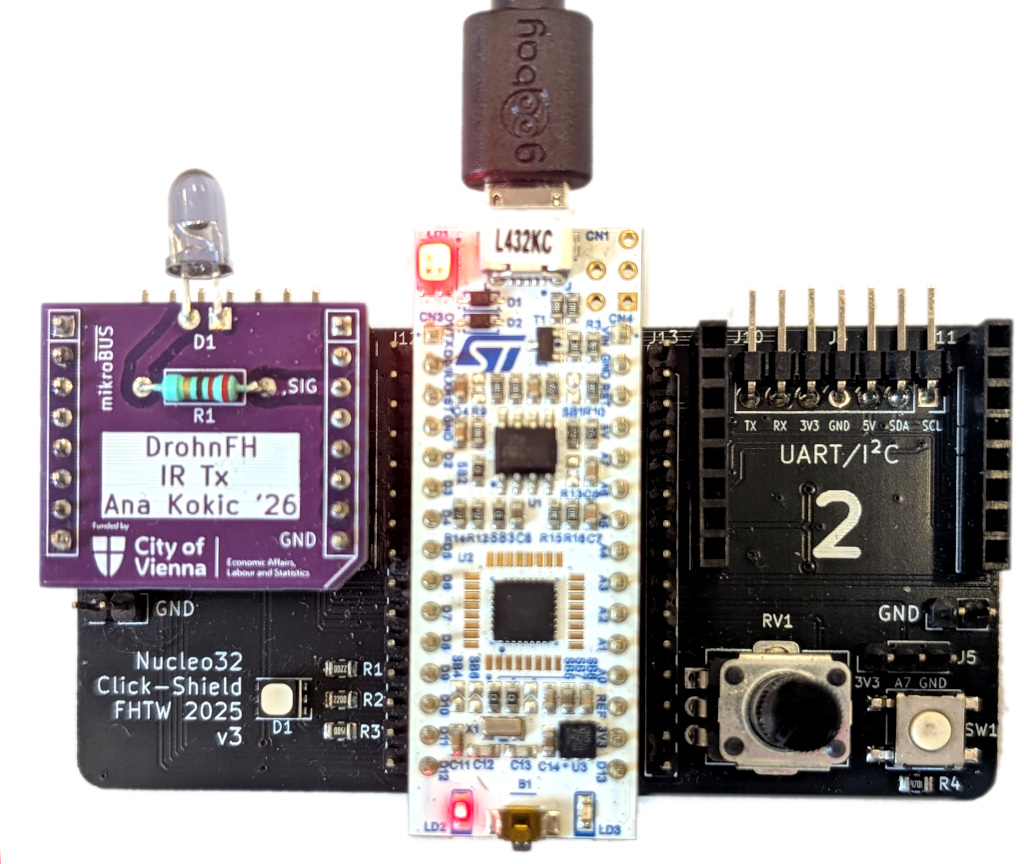
- Download and save the firmware binary matching your Group ID to your Nucleo "external drive":
tx-00.bin tx-01.bin tx-02.bin tx-03.bin tx-04.bin tx-05.bin tx-06.bin tx-07.bin tx-08.bin tx-09.bin tx-10.bin tx-11.bin tx-12.bin tx-13.bin tx-14.bin tx-15.bin
- Click the "Connect" button above and select your Nucleo's COM port or serial device.
- Point the IR transmitter at your Gimbal drone and send commands:
- Arm to start the drone's motors.
- Disarm to stop the drone's motors.
- The other commands adjust the drone's orientation.
This work is supported by the City of Vienna via the project Stadt Wien Kompetenzteam für Drohnentechnik in der Fachhochschulausbildung, MA23 Projekt Nr. 35-02.
|
|
|